Chrome Web Store
Listing pending. Until it’s approved, use the unpacked install steps above in Chrome.
WA Rich Export is live on the Microsoft Edge Add-ons store - install it in one click with no developer mode required. For Chrome, use the unpacked install while it goes through Chrome Web Store review.
No developer mode. No cloning. Just click and install.

Opens the official listing on microsoftedge.microsoft.com. Click Get on that page, then Add extension in the confirmation dialog.
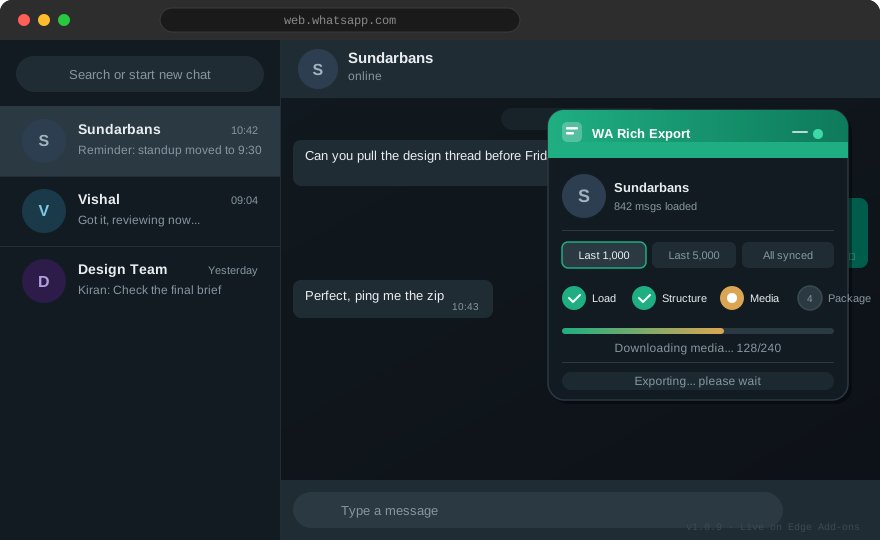
The floating panel attaches to WhatsApp Web automatically once the extension is installed.
Chrome Web Store listing is pending. These six steps get you running today.
Download or clone the project so you have a folder that contains manifest.json at its root - not nested inside another folder.
Go to chrome://extensions in the address bar.
It’s a toggle in the top-right corner of the extensions page.
Select the folder from step 1 - the one containing manifest.json. The extension appears in your toolbar immediately; no restart needed.
Go to web.whatsapp.com and scan in, as usual.
The WA Rich Export panel appears at the top-right. Pick a history depth, click Export chat, and the archive downloads as a .zip through your browser’s normal Downloads flow.
Pulled newer code into the same folder? Go back to chrome://extensions (or edge://extensions) and click the refresh icon on the WA Rich Export card. Reload any open WhatsApp Web tab afterwards.
Edge is live now. Chrome listing is pending review - use the unpacked steps above in Chrome in the meantime.
Listing pending. Until it’s approved, use the unpacked install steps above in Chrome.
Available in the official store - no developer mode required. One click installs it directly into Edge. See install steps above.